.svg)
|
Date |
|
|---|---|
|
Focus |
Centralized Agent Management, Captive Portal Connectivity & Analytics |
What's New in EnforceDNS!
Central Agent Management Improvements NEW
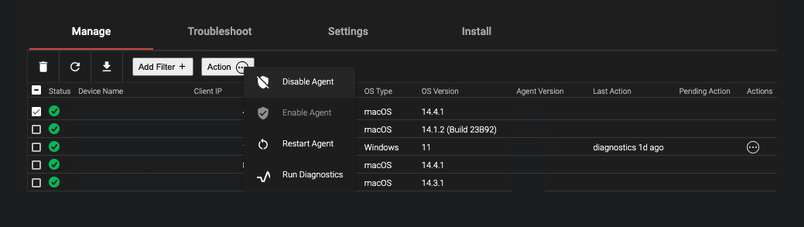
Administrators can now harness advanced central management capabilities to directly manage and troubleshoot Agents from the EnforceDNS UI. The new features include:
-
Disabling the Agent
-
Enabling the Agent
-
Restarting the Agent
-
Running Diagnostics on the Agent - View Debug Logs directly from the UI.
-
Downloading the Agent list - Download a comprehensive list all of the Agents deployed including all of the information seen on the Manage Agents Dashboard.
-
View Last Action Taken - See the most recent action performed on an Agent.
-
View Pending Actions - See actions that have been initiated but not yet executed.
-
Ability to apply actions to more than one Agent at a time.
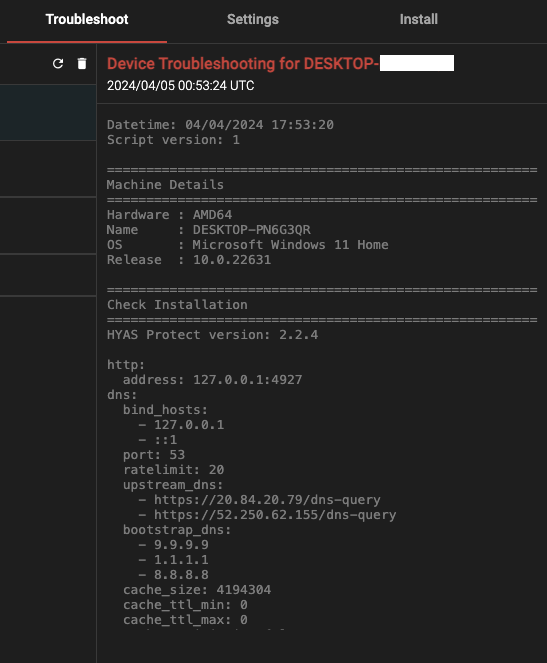
Troubleshooting becomes a breeze with the import of Debug logs right into the UI.
-
Simply select a machine (or multiple machines) and click on Run Diagnostics.
-
The output is displayed directly in the UI showcasing information such as:
-
Machine Details: Hardware, Machine Name, OS and release version
-
Check Installation: Displays the EnforceDNS version number, bind hosts, upstream DNS
-
Network Interfaces: Adapters, media state, MAC Address, DHCP configuration, IPv4, IPv6
-
Port 53 connections: TCP/UDP connections and current states
-
Last 500 lines of the log file
-
Last 500 lines of the querylog file
-
Benefits:
-
Administrators gain effortless control over Agents right from the EnforceDNS UI, streamlining management tasks and simplifying troubleshooting, all without the need to access individual agent machines.
-
By accessing debug logs and machine details via the UI, administrators gain invaluable insights into agent performance. This centralized access not only facilitates rapid issue identification and resolution but also strengthens system reliability and security, ultimately providing a smoother experience for end-users.
Supported Platforms:
-
macOS
-
Windows
Agent Improvements - Central Management v2.2.5 NEW
The updates to the Agent enable enhanced capabilities for Central Agent Management directly from the EnforceDNS UI. This streamlined management process empowers administrators to troubleshoot efficiently without the need to access individual agent machines.
Benefits:
-
Administrators can perform various management tasks directly from the EnforceDNS UI thus streamlining the management process and saving time by eliminating the need to access individual agent machines.
-
Accessing debug logs and machine details within the UI provides administrators with valuable insights into agent performance and troubleshooting.
Supported Platforms:
-
macOS
-
Windows
Agent Improvements - Captive Portal v2.2.5 IMPROVEMENT
To improve the user experience when connecting to a captive portal, DNS query timeouts have been modified to enhance captive portal detection, with a particular focus on scenarios like airline/airport captive portals, which can result in prolonged timeouts.
Furthermore, the Agent now initiates a sequence of requests to predefined captive portal test URLs. If an HTTPS request is intercepted, indicating the presence of a captive portal, the Agent identifies it and acts accordingly.
Benefits:
-
Improved captive portal detection allowing for a more seamless experience when connecting to a public Wifi network.
Supported Platforms:
-
macOS
-
Windows
Improved Visibility of Agent Status IMPROVEMENT
Additional context is now included around Agent Status. There are now 5 (with a 6th to be added in a future release) different states building on the original 3:
-
Installed, Enabled, Active - Agent installed and working properly
-
Installed, Enabled, No status <48h - Agent hasn’t checked in with the backend for less than 48hrs
-
Installed, Enabled, No Status >48h - Agent hasn’t checked in with the backend for more than 48hrs
-
Installed, Enabled, Inactive due to problem - Agent is installed and enabled but experiencing a communication issue
-
Installed, Disabled/Bypassed - Agent has been disabled/bypassed by the Administrator
-
Uninstalled (Uninstalled status coming in a future release)
Status indicators, in order:

Benefits:
-
Enhanced Monitoring: Detailed agent status states offer improved oversight, aiding administrators in quickly identifying performance issues or anomalies.
-
Improved Security: Enables administrators to take proactive measures to address any potential security concerns, such as identifying and addressing agents that have been disabled or bypassed, thereby maintaining the integrity of the security infrastructure.
Aggregation by Ruleset NEW
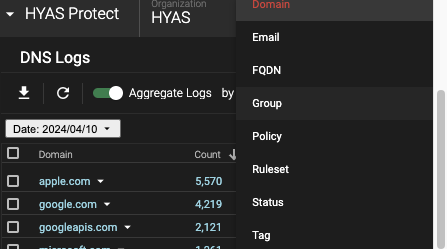
Users now have the capability to aggregate logs based on the Rulesets established within the Policy Engine. This enhancement allows for the organization and analysis of logs according to the specific criteria and rules defined within each Ruleset, streamlining the monitoring and management of security events and activities.
Benefits:
-
Improved Visibility: Easily track security events tied to specific policy rules, enhancing overall visibility into rule effectiveness and identifying areas for improvement.
-
Simplified Analysis: Grouping logs by Rulesets streamlines data interpretation within the context of security policies, making it easier to detect patterns, anomalies, and compliance issues.
-
Efficient Management: Organizing logs based on Rulesets streamlines incident investigation and resolution, reducing the time and effort required to identify and respond to security incidents.